You have evaluated an AI agent’s proposed action against your policies, and the answer came back: ALLOW. The action is permitted. Now what?
In a naïve governance system, “allowed” means the action runs without further constraint. But in any real-world deployment, this creates a problem: the system’s behavior after approval can still cause harm. A permitted linter tool might be compromised. A permitted command might consume all available memory. A permitted process might open a network connection and exfiltrate data.
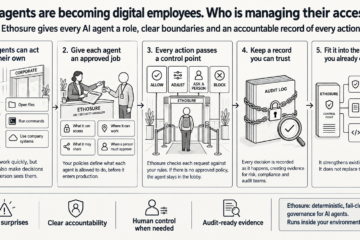
Ethosure addresses this through runtime sandboxing – the second layer of its two-layer architecture. The first layer (the control plane) decides whether an action should happen. The second layer (the data plane, implemented as a runtime sandbox) constrains what the approved action can actually do.

What sandboxing means in this context
Sandboxing is not a new concept. Browsers sandbox JavaScript so that a webpage cannot read files from your hard drive. Mobile operating systems sandbox apps so they cannot access camera or contacts without explicit permission. The principle is the same here: grant the minimum capabilities an approved process needs to do its job, and no more.
In the coding ethos project, sandboxing is implemented using native Linux kernel features. There is no Docker, no virtual machine, no third-party wrapper. The sandbox is built directly into the enforcement runtime.
The capability model
Every managed tool in coding-ethos has a capability declaration – a structured statement of what it needs to do its job. The declaration covers:
- Read paths: which directories the tool is allowed to read.
- Write paths: which directories the tool is allowed to write to.
- Network access: whether the tool needs a network connection. By default, tools are no-network.
- Git access: whether the tool is allowed to call Git. Ordinary linters receive explicit `no-git` tags.
- Timeout, memory, and CPU limits: hard bounds on resource consumption.
When a managed tool runs, the sandbox enforces these declared capabilities – not as a suggestion, but as a kernel-level constraint. The tool cannot do what the declaration does not permit, regardless of what the tool’s code might attempt.
The Linux kernel mechanisms
The sandbox uses three main kernel mechanisms:
Linux namespaces create an isolated environment for the process. A new PID namespace means the process has its own private process tree – it cannot see or signal other processes on the host. A new network namespace, for ordinary offline tools, means the process has no network connectivity whatsoever – not even loopback – so exfiltration is structurally impossible, not just policy-prohibited.
Landlock is a Linux security module that enforces filesystem access control. Before the sandboxed process starts, the sandbox installs a Landlock ruleset that specifies exactly which filesystem paths the process can access and whether it can read or write them. The repository and `.git` are mounted read-only. Declared write paths receive write rules. Everything else is off-limits. If the process attempts to write to `.git` – perhaps to tamper with hook definitions – Landlock blocks that write at the kernel level. It is not a policy finding; the write simply fails.
Cgroup resource limits cap the process’s CPU and memory consumption. When the tool’s capability declaration requests resource bounds, the sandbox creates a temporary cgroup v2 hierarchy, sets the limits, and starts the child process inside it. Memory limit exceeded means the process is terminated. CPU limit means throttled execution. These limits prevent a runaway or malicious tool from degrading the host.
Fail-closed sandbox behavior
An important property: if the sandbox cannot be set up properly, the tool does not run in an unsandboxed fallback mode. According to the coding-ethos documentation: “the runner must not fall back to unsandboxed execution when a Linux tool declares a sandbox profile.” A missing kernel feature or failed namespace setup results in a `runtime.sandbox_denial` finding – a blocking event – not a degraded-but-running tool.
This fail-closed behavior for the sandbox mirrors the fail-closed behavior of the policy layer. The system’s defaults are always conservative.
Sandbox evidence in the ledger
Sandbox execution is traceable. The capability declaration, the selected sandbox profile, the resource limits, and any runtime denials are recorded into the evidence ledger. SARIF output includes sandbox metadata under `runs[].properties.sandbox`. This means an audit trail does not just say “the linter ran” – it records what capabilities were granted, whether any were denied at runtime, and what resources were consumed.
If a tool unexpectedly tried to open a network connection and was blocked by the network namespace, that denial appears in the evidence as a `runtime.sandbox_denial` finding. The governance record is complete.
Why this matters for your organization
For the security team: the sandbox means that approving an action to run a tool does not create an open-ended permission. The tool runs in a cage. Even if the tool is compromised, updated maliciously, or behaves unexpectedly, the kernel enforces the capability boundary.
For the compliance team: the capability model creates an auditable record of what each tool was permitted to do. “Our linters were prohibited from network access and could only write to their declared output directory” is a demonstrable statement, backed by kernel-level enforcement and SARIF evidence.
For the engineering team: the capability declarations are version-controlled alongside the rest of the policy configuration. If a new tool version requires broader access, that is a deliberate, reviewable configuration change – not a silent expansion of capabilities.
The sandbox is the system’s answer to the question: “But what if something goes wrong after it’s allowed?”